Tech Corp YouTube Banner: Your Channel's First Impression
Let's be honest: the default YouTube banner is a missed opportunity. That prime real estate at the top of your channel is the first thing a potential subscriber sees. It’s your digital storefront sign, your magazine cover, and your handshake all rolled into one. A generic or poorly designed banner can make even great content look amateur. That’s where a dedicated, professional asset like the Tech Corp YouTube Banner template comes in, transforming that space from an afterthought into a powerful branding tool.
Beyond a Pretty Picture: The Anatomy of a Professional Banner
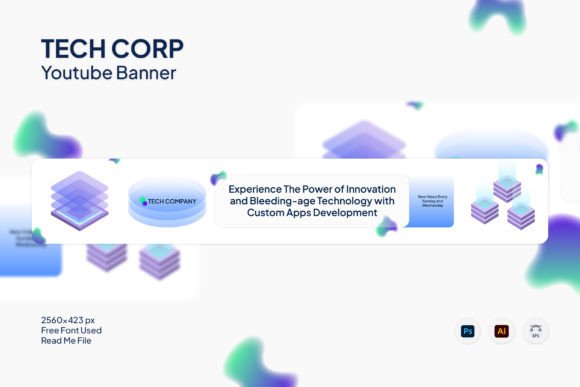
The Tech Corp template isn’t just a static image; it’s a fully realized design asset built for real-world use. Its visual personality is one of clean, modern sophistication. Think crisp lines, balanced negative space, and a structure that guides the viewer's eye. It avoids overly trendy elements that might date quickly, opting instead for a timeless aesthetic that conveys professionalism and reliability. This makes it an excellent foundation for building a strong brand identity, whether you're a solo creator or a growing business.
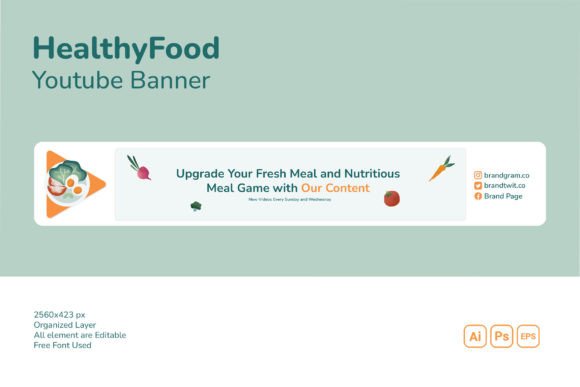
What truly sets it apart is its technical preparation. Delivered in AI, EPS, and PSD formats, it’s built for designers who need to work efficiently. The neatly organized layers are a godsend, allowing you to isolate and edit text, graphics, and background elements without digging through a chaotic file. The specified 2560 x 423 px size at 72 DPI is precisely optimized for YouTube's current banner display across all devices, from desktop to mobile TV. You’re not guessing at dimensions; you’re starting with a pixel-perfect canvas. The use of a free font also removes a common barrier, ensuring you can customize the text without additional licensing costs right out of the gate.
Strategic Applications for Creators and Brands
Understanding where the Tech Corp YouTube Banner template excels is key to leveraging its full potential. Its modern typography and adaptable layout make it a versatile player across numerous fields.
- For Content Creators and Streamers: A gaming channel can use the template to showcase bold, custom graphics and a channel slogan. A tech reviewer might utilize the clean sections to highlight featured product categories or upload schedules. The professional look immediately builds credibility with an audience that values quality.
- For Businesses and Entrepreneurs: This is where the template shines as a commercial font and design solution. A SaaS company can integrate its logo and core value propositions. A local bakery or boutique can use it to display beautiful photography of their products and location, creating an inviting online presence that extends their physical brand.
- For Marketers and Publishers: The banner can be designed to promote a specific campaign, a new product launch, or a flagship piece of content. Its structured layout helps establish visual hierarchy, ensuring the most important message—like a website URL or a call-to-action—is seen first.
The visual consistency it provides is invaluable. Using this banner across your YouTube channel, and perhaps adapting elements for social media graphics on other platforms, reinforces brand recognition. Viewers start to associate that specific color scheme and style with your content, which is a fundamental goal of any logo design or branding effort.
Practical Guide to Customization and Implementation
Getting the most out of the Tech Corp template involves a few thoughtful steps. Don't just swap out the text and call it done.
Evaluate and Align: Before you open the file, have a clear idea of your brand's color palette and key messaging. Does the template's default aesthetic align with your brand's personality? A financial advisor might lean into the template's corporate feel with blues and grays, while a lifestyle vlogger could soften it with pastels and warmer imagery. The template is a starting point, not a rigid mold.
Master the Edit: Take advantage of the organized layers. In Adobe Illustrator or Photoshop, lock layers you aren't working on to avoid accidental changes. Experiment with the font pairing suggestions in the help file, or test your own brand fonts. Ensure any text is legible against the background, especially when viewed on a mobile phone screen where the banner is often cropped significantly.
Test Relentlessly: After customization, preview your banner on multiple devices. How does it look on a desktop monitor versus a smart TV? What about the critical mobile crop? Is your channel name or tagline still visible? This real-world testing is crucial for readability and ensuring your message isn't lost.
Think Beyond YouTube: The individual elements within the PSD or AI file—a custom graphic, a stylized text treatment, a color block—can be repurposed. Use them to create matching profile pictures, channel art for featured playlists, or even graphics for your website's header. This is how you build a cohesive brand identity that feels intentional and professional across every touchpoint.
In the end, the Tech Corp YouTube Banner is more than just a template. It’s a strategic tool that helps you communicate professionalism, capture attention, and build a recognizable brand in the crowded digital space. By approaching it with a designer's eye and a marketer's strategy, you can turn that top-of-page banner into one of your channel's most effective assets.