Streamline Your Billing with a Professional Price Invoice Template
Getting paid is the goal, but the administrative side of running a business can often feel like a bottleneck. Sending a clear, professional invoice is more than just asking for money; it’s a final handshake that reinforces your brand’s credibility. A cluttered or amateurish bill can create doubt, while a sleek, well-organized document ensures a smooth transaction. The Price Invoice Template is designed to bridge the gap between functionality and high-end design, offering a solution that looks as polished as the work you deliver.
A Versatile Asset for Every Creative and Entrepreneur
This isn't just a basic fill-in-the-blanks form. The Price Invoice Template is built as a comprehensive design asset, catering to a wide range of professionals. Whether you are a freelance graphic designer, a small business owner selling handmade crafts, or a marketing agency managing multiple clients, this package provides the flexibility you need. It speaks the language of modern typography and clean layout, ensuring your paperwork matches the quality of your brand identity.
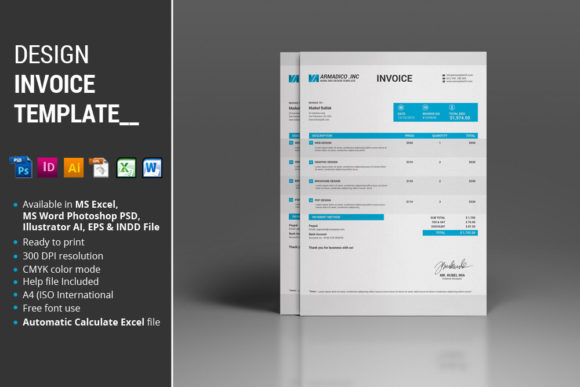
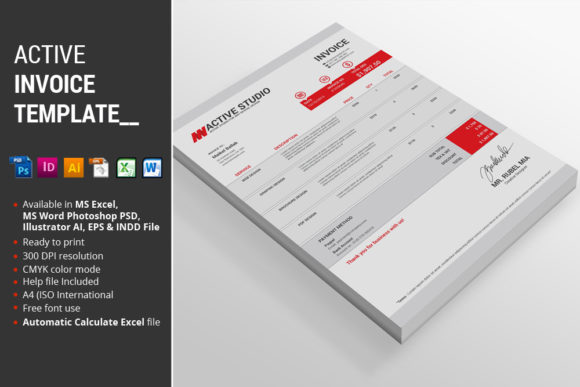
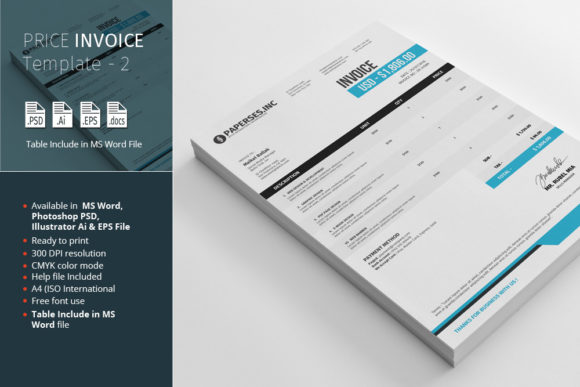
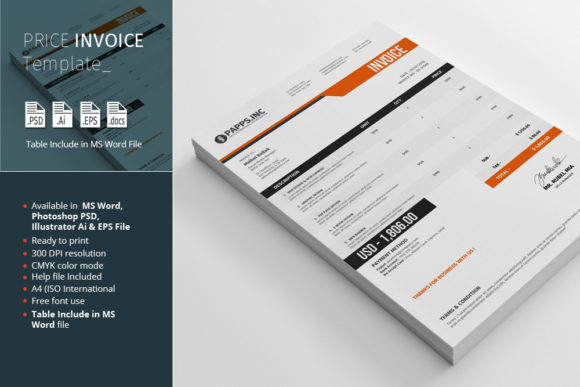
The visual character of this template is one of organized sophistication. It utilizes a clean layout that prioritizes readability without sacrificing style. The design is intentional, guiding the recipient's eye naturally from the client details to the itemized list of services and the final total. It avoids unnecessary ornamentation, focusing instead on clear hierarchy and professional spacing. This makes it an ideal choice for those who value a modern, minimalist aesthetic in their business communications.
Unpacking the Package: What You Get
One of the strongest aspects of this offering is the breadth of file formats included. Understanding that different professionals work with different tools, the package is equipped with multiple source files to ensure seamless integration into your workflow.
When you download the Price Invoice Template, you receive:
- 1 MS Word 2010 file: Perfect for those who need quick, editable documents without requiring advanced design software. The Word file includes a structured table, making data entry straightforward and organized.
- 1 Photoshop PSD file: Ideal for designers who prefer working within the Adobe ecosystem and want pixel-perfect control over the layout.
- 1 Illustrator Ai file: The go-to for vector-based editing, ensuring your invoice scales perfectly and maintains crisp lines.
- 1 Illustrator EPS file: A versatile vector format that works across various design platforms.
- Instructions PDF: A helpful guide to get you started, including links to any premium fonts used in the design.
This multi-format approach means you aren't locked into a single piece of software. If you need to make a quick text edit, use Word. If you need to adjust the color scheme or layout to perfectly match a specific client's brand guidelines, use the PSD or Ai files.
Key Features and Design Specifications
The utility of a template lies in its details. The Price Invoice Template has been developed with specific technical standards to ensure it performs well in both digital and print environments.
Key features include:
- Changeable Color: You aren't stuck with a preset palette. The files are organized to allow easy color swaps, so you can align the invoice with your specific brand colors in seconds.
- A4 International Standard: The layout is set to A4 dimensions, which is the standard ISO paper size used globally, ensuring it prints correctly on standard printers without scaling issues.
- Fully Organized Layers: In the PSD and Illustrator files, every element is properly named and grouped. This saves you time when navigating the file, allowing for quick edits without hunting for hidden layers.
- CMYK Color Mode: The design files are set up in CMYK, the color standard for professional printing. This ensures that the colors you see on screen translate accurately to the printed page, avoiding any washed-out surprises.
- Table Structure in Word: The Word file isn't just a picture of a table; it contains a functional, editable table structure, making it practical for actual data entry.
Practical Application: Beyond Just Billing
While the primary function is billing, the versatility of the Price Invoice Template allows it to be repurposed for other business needs. Because of its clean design and structured layout, it can easily be adapted into a price list template for showcasing your services, a quote sheet for potential projects, or even an order form for e-commerce.
For creative agencies and freelancers, consistency is key. Using this template helps build a cohesive brand experience. When a client receives a proposal, a contract, and finally an invoice that all share a similar visual language, it reinforces your professionalism. It signals that you pay attention to details—a quality clients look for in creative partners.
Choosing the Right Font and Pairings
Typography plays a massive role in the effectiveness of business documents. The Price Invoice Template comes with instructions regarding the fonts used in the preview. Usually, templates like this utilize a combination of a serif font for headers to add a touch of tradition and authority, paired with a sans serif font for the body text to ensure maximum legibility for numbers and descriptions.
When customizing your invoice, consider how the typography influences the reader. If your brand is playful, you might swap the header font for a clean script font or handwritten font, but keep the body text strictly sans serif to ensure the invoice details remain easy to scan. The goal is to balance personality with practicality.
Tips for Evaluation and Testing
Before finalizing your invoice design for client use, take a moment to test it. Print a physical copy to check for readability and margin alignment. Digital screens can sometimes distort spacing, so a physical test ensures your "premium font" choices look just as good on paper as they do in the design software.
Also, consider your audience. If you are a web designer sending invoices to tech startups, a modern, minimalist layout works best. If you are a crafter selling on platforms like Etsy, a slightly warmer tone might be appropriate. The ability to change colors and fonts means you can tailor the template to fit the specific "personality" of your business.
Ultimately, the Price Invoice Template is more than just a digital file; it is a tool for better business management. It removes the friction from the administrative side of creativity, allowing you to focus on what you do best while ensuring you look professional every step of the way.